Uploader

by Cards For All People

NEED HELP?

Check out our instructions page to customize your game.

  • Character Creation Form
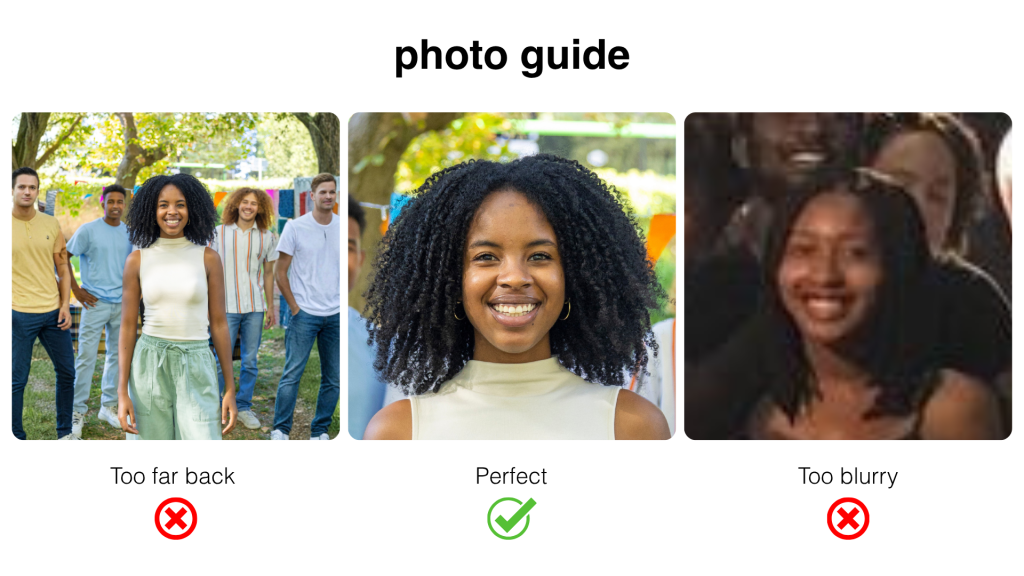
    A photo guide displaying three images: the first image shows a woman too far back in a group photo; the second image is a perfect close-up of the woman smiling; the third image is too blurry.

    Upload your character names and images to complete your custom “Who All Over There?” game order. Check out our instructions page for helpful tips.


    Ex. #12345

    Ex. Uncle Bob
    Click the edit icon to crop and edit your photo. Please use high resolution images to avoid pixelation. All images will be printed as a square aspect ratio (1:1).
    Ex. Auntie Verna
    Click the edit icon to crop and edit your photo. Please use high resolution images to avoid pixelation. All images will be printed as a square aspect ratio (1:1).
    Ex. Grandma Crystal
    Click the edit icon to crop and edit your photo. Please use high resolution images to avoid pixelation. All images will be printed as a square aspect ratio (1:1).
    Ex. Grandpa Sam
    Click the edit icon to crop and edit your photo. Please use high resolution images to avoid pixelation. All images will be printed as a square aspect ratio (1:1).
    Ex. Little Michael
    Click the edit icon to crop and edit your photo. Please use high resolution images to avoid pixelation. All images will be printed as a square aspect ratio (1:1).
    Ex. Tito
    Click the edit icon to crop and edit your photo. Please use high resolution images to avoid pixelation. All images will be printed as a square aspect ratio (1:1).
    Ex. Jackie
    Click the edit icon to crop and edit your photo. Please use high resolution images to avoid pixelation. All images will be printed as a square aspect ratio (1:1).
    Ex. Uncle Larry
    Click the edit icon to crop and edit your photo. Please use high resolution images to avoid pixelation. All images will be printed as a square aspect ratio (1:1).
    Ex. Randy
    Click the edit icon to crop and edit your photo. Please use high resolution images to avoid pixelation. All images will be printed as a square aspect ratio (1:1).
    Ex. Jermaine
    Click the edit icon to crop and edit your photo. Please use high resolution images to avoid pixelation. All images will be printed as a square aspect ratio (1:1).
    Ex. Rebbie
    Click the edit icon to crop and edit your photo. Please use high resolution images to avoid pixelation. All images will be printed as a square aspect ratio (1:1).
    Ex. Janet
    Click the edit icon to crop and edit your photo. Please use high resolution images to avoid pixelation. All images will be printed as a square aspect ratio (1:1).
    Ex. Marlon
    Click the edit icon to crop and edit your photo. Please use high resolution images to avoid pixelation. All images will be printed as a square aspect ratio (1:1).
    Ex. LaToya
    Click the edit icon to crop and edit your photo. Please use high resolution images to avoid pixelation. All images will be printed as a square aspect ratio (1:1).
    Ex. Katherine
    Click the edit icon to crop and edit your photo. Please use high resolution images to avoid pixelation. All images will be printed as a square aspect ratio (1:1).
    Ex. Joe
    Click the edit icon to crop and edit your photo. Please use high resolution images to avoid pixelation. All images will be printed as a square aspect ratio (1:1).
    Ex. Paris
    Click the edit icon to crop and edit your photo. Please use high resolution images to avoid pixelation. All images will be printed as a square aspect ratio (1:1).
    Ex. Prince
    Click the edit icon to crop and edit your photo. Please use high resolution images to avoid pixelation. All images will be printed as a square aspect ratio (1:1).
    Ex. Uncle Martin
    Click the edit icon to crop and edit your photo. Please use high resolution images to avoid pixelation. All images will be printed as a square aspect ratio (1:1).
    Ex. Aunt Lula Mae
    Click the edit icon to crop and edit your photo. Please use high resolution images to avoid pixelation. All images will be printed as a square aspect ratio (1:1).